AI fleet assistant: ask about your fleet in plain words
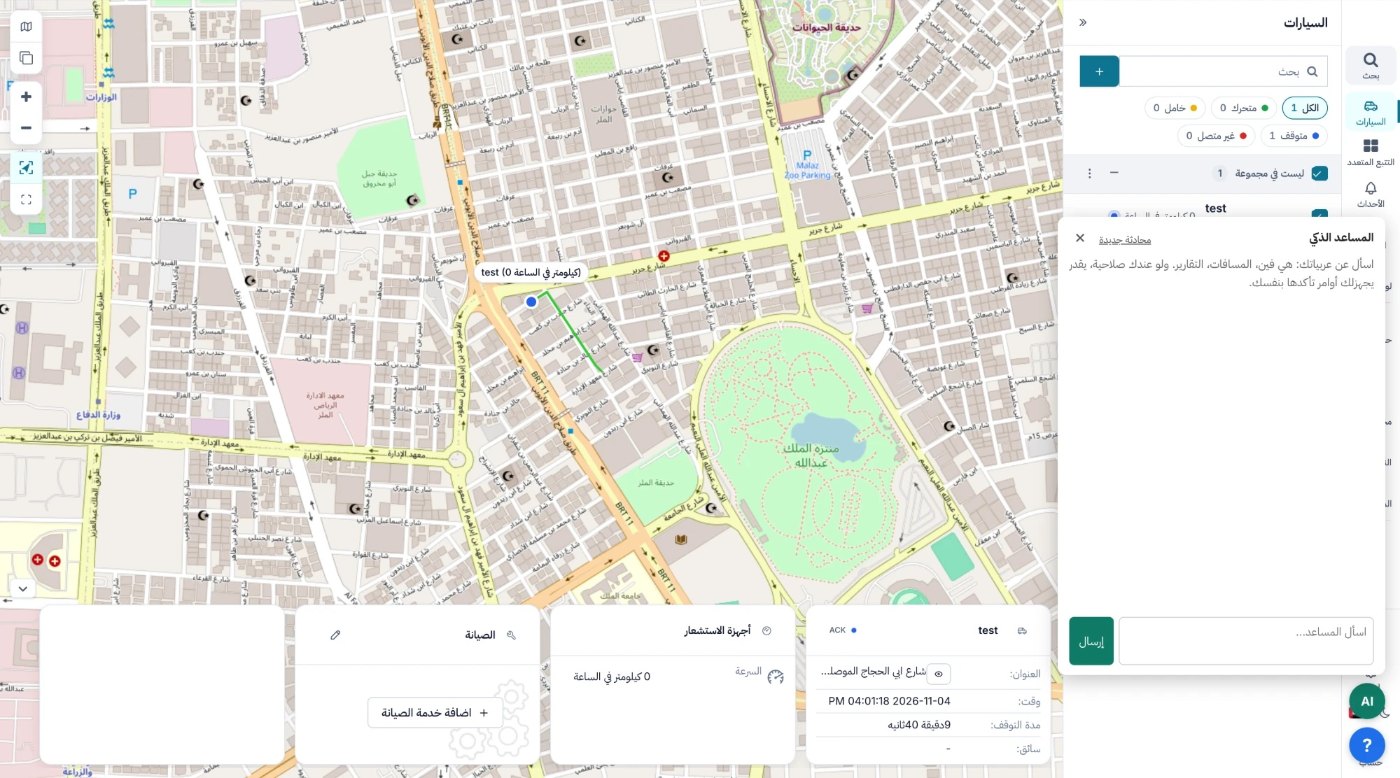
The AI fleet assistant is built into the FMS GPS platform, beside the live map, and answers your questions from your own vehicle data. Fleet managers and operations teams ask about location, distance, alerts or reports in plain words, instead of digging through menus and reports.
What does the solution include?
Beside the live map
The assistant opens on the same screen as the live map, with no extra app or separate screen.
Location and distance
Ask where a vehicle is to see its status, last location and last signal time, or how far it drove today.
Alerts
Ask which alerts fired, with the overspeed time, speed, limit and location.
Reports and driving behavior
A quick summary of speed, trip and stop reports, and the vehicles with the most violations.
Commands with confirmation
For authorized users, the assistant prepares a command that runs only after you confirm it yourself.
Alerts by call and WhatsApp
On overspeed, the assistant calls the supervisor and reads the alert; if there is no answer, it arrives on WhatsApp.
Problems it solves
Too many menus
Getting one answer means digging through several menus and screens.
Long reports
You open a full report just to check one detail.
Losing your place
Switching screens takes you away from the live map.
Unseen alerts
Overspeed alerts go unnoticed when no one is in front of the screen.
Who needs follow-up?
It is hard to see quickly which vehicles have the most violations.
Unreviewed commands
A command sent to a vehicle by mistake, with no confirmation step.
How does it work?
Log in
Open the FMS GPS platform in a browser on desktop or mobile with your usual account.
Open the assistant
It appears beside the live map.
Ask your question
In plain words: location, distance, alerts or a report.
Confirm before it runs
If you ask for a command, it waits for your review and confirmation.
Who is it for?
Fleet managers
Quick answers on vehicles, distances and reports without opening each report.
Operations teams
Ask the way you would ask a colleague in operations, while you watch the map.
Supervisors
Overspeed alerts by call and WhatsApp, even when they are away from the screen.
Frequently asked questions
What is the AI fleet assistant?
An assistant inside the FMS GPS platform that you ask about your fleet in plain words. It reads your vehicle data and answers about location, distance, alerts and reports.
Can the assistant send commands to a vehicle on its own?
No. For authorized users it prepares the command, and it runs only after the user reviews and confirms it.
How do overspeed alerts reach me?
In the platform, on WhatsApp and by a voice call where the assistant reads the alert to the supervisor. If the supervisor does not answer, the alert arrives on WhatsApp.
Do I need extra hardware in the vehicle?
No. The assistant works on the data your tracking device already sends to the platform.
Can I use it on my phone?
Yes. You open the platform in a browser on desktop or mobile with your usual account.
See the assistant on your fleet
Request a demo, and we will show you the assistant answering real questions in the platform.